
- Entertainment
- Style
- Lifestyle
- Food & Drinks
- Tech & Auto
- Culture

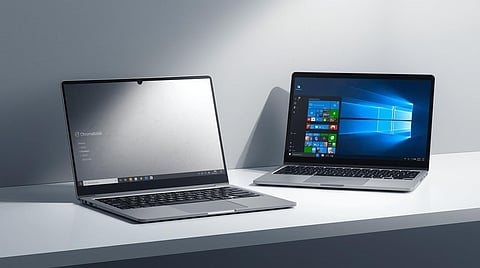
Every couple of years, the same question comes creeping in. You need a new laptop. You’re ready to spend. But then that tiny voice says, “Wait… do I really need a full Windows machine? Could I live with a Chromebook instead?”
It all makes sense to be honest. Now more than ever with recent upgrades to ChromeOS and how Windows is leaning into cloud and efficiency the line between the two has never been fuzzier.
It sounds simple enough on the surface. After all, both devices let you browse the web, write documents, check email, and binge-watch your favorite shows. But if you dig just a little deeper, the choice between these two platforms can feel a little puzzling.
In recent years, the line between Chromebooks and Windows laptops has started to blur. Chromebooks are no longer just budget-friendly browsing boxes anymore. With support for Android apps, offline features, and even Linux tools, they’ve started to carve out a serious space in classrooms, offices, and cafés everywhere. Meanwhile, Windows laptops, long the default option for just about everyone, are becoming leaner, faster, and more cloud-aware than ever before. Suddenly, choosing between the two doesn’t feel so obvious anymore.
So how do you choose?
First, you need to figure out if you are the kind of person who thrives in a simple, streamlined, browser-based world or you need the full versatility of a classic PC experience? That’s exactly what we’re about to unpack.
Chromebooks offer an experience that feels clean, minimal, and focused. If you live in Google’s ecosystem — Gmail, Docs, Drive, Calendar — the transition is seamless. Boot times are almost instant, battery life stretches for hours, and there’s an overall lightness to the experience that many users grow to love. You don’t have to think about system updates or worry about malware. It just works. And for many people especially, students, remote workers, casual users that’s more than enough.
In fact, it’s ideal.
But Chromebooks aren’t for everyone. They can feel limiting for users who need to install traditional software, connect to specialised hardware, or work offline in more complex ways. Despite their progress, they still fall short when it comes to heavy multitasking, pro-level creative tools, and gaming. If your workflow involves Adobe software, full-featured spreadsheets, or high-performance tasks, a Chromebook probably won’t keep up. And while Android app support is improving, it’s not quite the same as having access to full desktop-class software.
That’s where Windows laptops hold their ground. Their biggest strength has always been their versatility. Whatever you need to do, chances are, you can do it on Windows. Whether it’s professional-grade video editing, software development, enterprise-level tools, or gaming, Windows gives you room to grow, experiment, and customise. It offers you freedom, sometimes a little messy, sometimes a bit high-maintenance but freedom all the same.
That freedom, however, comes with its own cost. Maintenance is more hands-on. You’re in charge of updates, drivers, and the occasional troubleshooting. And while there are excellent Windows laptops with great battery life and sleek designs, you often have to pay more for premium quality. The trade-off is power and flexibility which, for many users, is more than worth it.
The trade-off is flexibility. A Windows laptop can be whatever you need it to be: a gaming rig, a work machine, a design studio, or all of the above. And in the mid-tier, around $700 to $1,000, the value has become stronger than ever. Laptops like the Dell 14 Plus or Asus Vivobook 14 offer powerful internals 16 GB of RAM, terabyte-level storage, even Snapdragon chips delivering all-day battery life without breaking the bank. Windows is still the king of versatility, even if it sometimes feels like a bit more work to manage.
So how do you decide which one is right for you?
It comes down to your habits and your expectations. If most of your digital life happens inside a browser, if you live in Google Docs, stream content, and work in web apps, then a Chromebook can be a surprisingly powerful tool. It boots up fast, stays out of your way, and feels clean and focused. For students, casual users, and even some remote workers, it’s more than enough and often better than any Windows alternative in the same price range.
But if you need freedom — the freedom to download software, to connect niche hardware, to game or edit or code in a specific environment, then Windows still offers the widest lane. It’s not as light or clean, but it does more. And for many users, that “more” is essential.
There’s no wrong choice, of course, only the wrong fit. What’s become clear is that the old idea of Chromebooks being “just for schools” or “not real laptops” is outdated. They’re not trying to be Windows laptops anymore. They’re trying to be something simpler, lighter, and for many better.
In the end, your laptop shouldn’t just match your tech specs. It should match your life. If you need less, a Chromebook is the best kind of less: streamlined, secure, surprisingly capable. If you need more, Windows still offers everything as long as you’re ready to take the reins.